Conversation Playbook 💡 Pause Contact Lists - July 2023

July 2023 - Learn how to instantly pause/unpause messaging to a Contact List.
Conversica Tip 02: Pause Contact Lists
Looking to temporarily stop messages from reaching a specific audience?
Sometimes you need to take a break from messaging a Contact List, update the conversation copy before continuing to send, or fix which leads are receiving this content. Whatever your reason to pause sending messages to a specific Contact List, it’s easy to do right from your Conversation Editor dashboard.
There is no messaging activity when your Contact List is in the paused status. No new leads will be received to Conversic and the RDA will not send any messages to any leads previously received or in a messaging status.
How to pause Contact Lists
Step 1: Go to Conversation Editor.
Step 2: Select the Contact List you want to pause/unpause.
Step 3: Click on the Status dropdown menu (probably says “Active”).
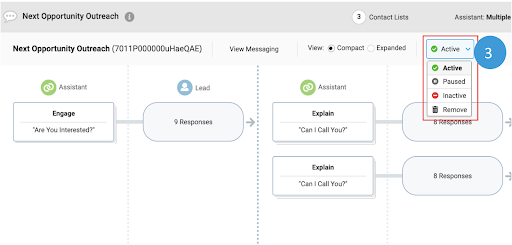
Step 4: Change it to “Paused”.
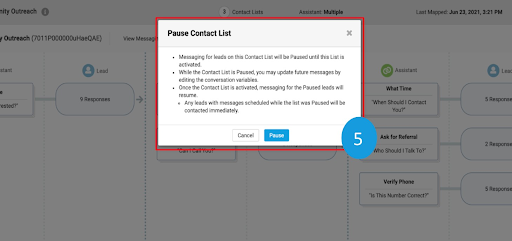
Step 5: The Pause Contact List confirmation screen will appear. Click Pause to confirm your request.
Step 6: When you’re ready to unpause, update the Status back to “Active” from the dropdown.
|
Additional Resources
|
Manage your Contact List from the Conversation Editor Understand how to locate, map, and update the status of your Contact Lists in this comprehensive guide. |
|
|
Overview of customizing conversations Find every Help Center article related to the Conversation Editor on this guidepage. |
|
|
Contact your CSM, AE, or Support Your Conversica team is happy to answer your questions and discuss best practices, how-to’s, and enhancements. |
Please sign in to leave a comment.
Comments
0 comments