Conversation Playbook 💡 Get the most out of dynamic fields - June 2023

Welcome to This New Series!
As part of the new Conversica Insider program, Conversation Playbook is a monthly email series focused on quick, actionable “how-to” tips to help you level up your Conversica skills. Each email will dive into a different product feature and provide additional resources to learn more about using it to its full potential.
We hope you find these emails helpful!
Conversica Tip 01: Dynamic Fields
Conversation Editor’s dynamic fields create necessary variation in your RDA communications
Dynamic fields are the central component of the Conversation Editor, color-coded for customized portions of your conversation. Here’s how to access this feature in Conversica:
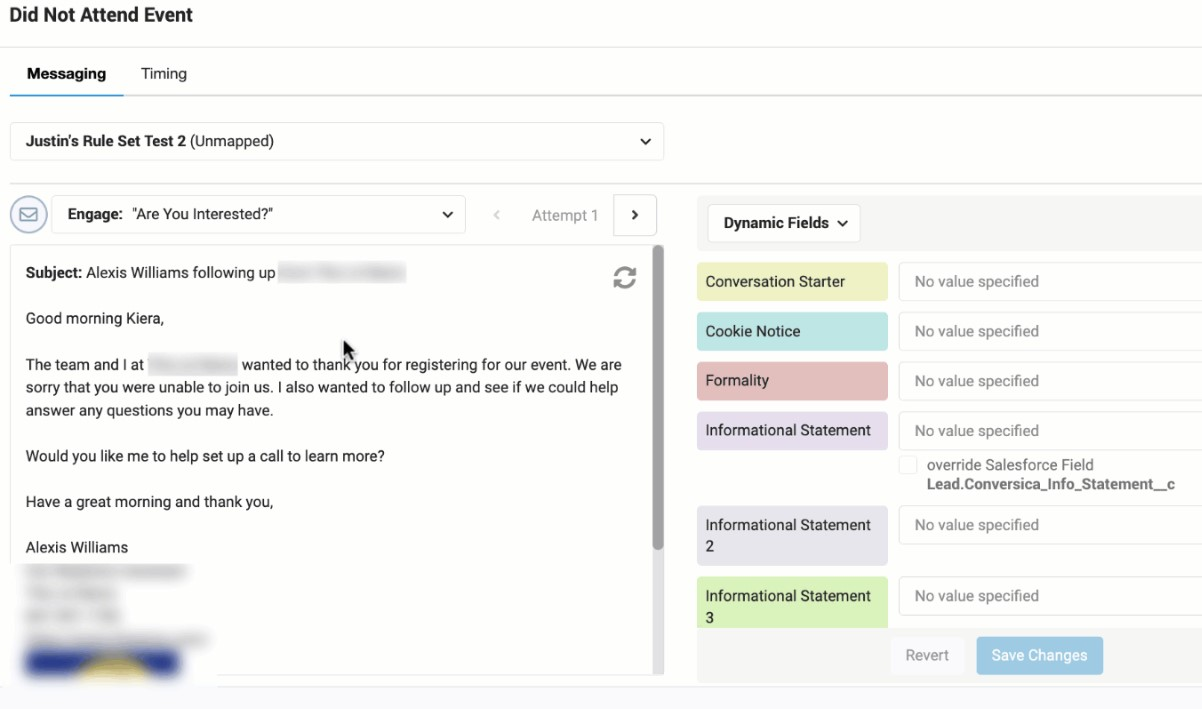
Edit a conversation’s dynamic fields to tailor your message for a specific audience and product/services. When you fill in these variables and create multiple versions for each field type, you are customizing your communications and further personalizing how you interact with prospects and customers.
Why this has a big impact on your communication performance
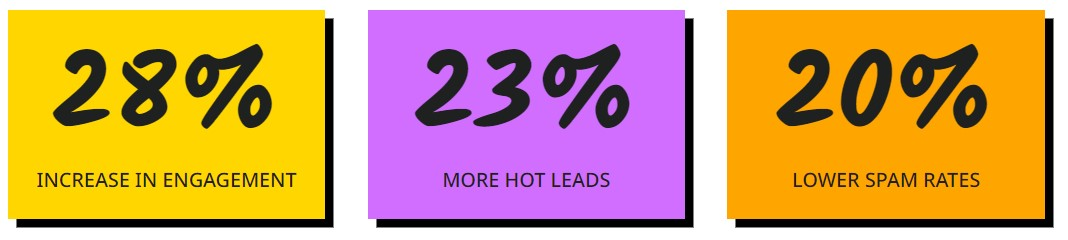
We know that personalized and relevant messaging performs better – dynamic fields are the tool that creates such tailored communications which resonate with your audiences. When you leverage your available dynamic fields, the results speak for themselves:
|
Get the Most Out of Dynamic Fields
The checklist you definitely want to save
🔲 Conversation Starters are attention-grabbing, positive greetings that exclude any offerings.
🔲 Product Descriptions are limited to 60 characters and straightforwardly describe the product or product name.
🔲 Informational Statements start with the pain-point, followed by how you can help.
🔲 Question Goals include personal language (ex: “our” vs. “the”).
🔲 Have 3+ variations for Product Description and Informational Statement.
This offers more opportunity to encourage action.
🔲 Fill in every relevant variable.
🔲 All values are clear, concise, and use active voice.
🔲 Check that your values make sense in every instance and phrases are not repeated elsewhere in the email.
🔲 Exclude spam-trigger words.
🔲 Review the dynamic fields for any warnings (ex: “This variable is required”).
If you’re missing a required field, you’re at risk of excluding leads!
🔲 Conversation Rules are established for optimal segmentation.
🔲 Include dynamic fields in your subject lines, too.
Additional Resources
|
Full guide to customizing conversations Find every Help Center article related to dynamic fields and Conversation Editor on this guidepage. |
|
|
Best practices for using Conversion Editor If you like this email, you’ll love this article that deep-dives into how to get the most out of dynamic fields. |
|
|
Leverage segmentation with Conversation Rules This is how to make each message feel researched and personal, where the variables are tailored to job title, industry, and/or interest area. |
|
|
Top-performing variable examples Use these “best practice” templates that result from an investigation into which messaging pulls the highest engagement for every type of dynamic field. |
|
|
Customize your subject lines After all, subject lines are your recipient’s first impression of how to engage – a personalized message using dynamic fields can go a long way. |
|
|
Contact your CSM, AE, or Support Your Conversica team is happy to answer your questions and discuss best practices, how-to’s, and enhancements. |
Please sign in to leave a comment.
Comments
0 comments